1、调用图片路径
<img src="{eyou:global name='web_templets_pc' /}/static/picture/b01_title.png">
2、列表内容循环标签写法

{eyou:list titlelen='100' pagesize='30'}
   <div class="swiper-slide">
         <div class="swiper-box">
              <div class="Wy-tupian">
                  <a href="{$field.arcurl}">
                      <img src="{$field.litpic}" alt="{$field.title}">
                    </a>
                  </div>
                  <div class="Wy-haoma"></div>
                  <div class="Wy-biaoti">
                    <a href="{$field.arcurl}">{$field.title}</a>
                  </div>
                </div>
              </div>
{/eyou:list}
3、调用logo的标签
{eyou:global name='web_logo' /}
4、调用导航
{eyou:channel type="top" row="60" id="field" currentstyle="activeNav"}

        <li class="{$field.currentstyle}"><a href="{$field.typeurl}">{$field.typename}</a></li>

{/eyou:channel}
5、调用基本信息
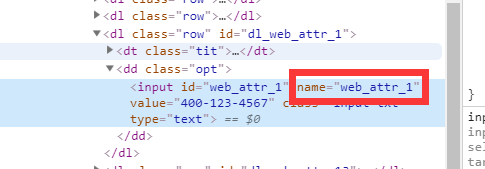
{eyou:global name='web_attr_1' /}
注:这里调用的基本信息的时候,就是name值改一下即可。(如下图)
6、调用当前栏目的图片
<img src="{$eyou.field.litpic}">
7、易优cms去底部版权的方法
注:这里的copyright我改成了id,因为id可以提高速度。比class更好一些,如果你想用class也是可以的。
7.1 js去版权
<script>
    $(function(){
      $("#copyright a:nth-child(1)").remove();
    })
</script>
7.2 css去版权
#copyright a:nth-child(1){
  display:none;
}
8、易优cms(eyoucms)的上一篇下一篇
{eyou:prenext get='pre' titlelen='30'}

<a href="{$field.arcurl}" title="{$field.title}" class="info_prev"> {eyou:lang name='sys11' /} : {$field.title}</span> </a>

{eyou:else /}

<a class="pre">{eyou:lang name='sys11' /}:{eyou:lang name='sys10' /}</a>

{/eyou:prenext}


{eyou:prenext get='next' titlelen='30'}

<a href="{$field.arcurl}" title="{$field.title}" class="info_next"> {eyou:lang name='sys12' /} : {$field.title}</span> </a>

{eyou:else /}

<a class="info_next">{eyou:lang name='sys12' /}:{eyou:lang name='sys10' /}</a>

{/eyou:prenext}
注:如果这里改的话,修改下class就可以了。
9、获取文章详情
{$eyou.field.content}
10、获取作者
{$eyou.field.author}
11、获取日期
{$eyou.field.add_time|MyDate='Y-m-d H:i:s',###} /*这里如果是从某个标签内的话把 $eyou去掉即可。*/
12、获取点击数
{eyou:arcclick /}
13、详情页获取栏目图片
{eyou:flink type='text' row='30' titlelen='15'}

   <a href="{$field.url}" target="_blank">{$field.title}</a>

{/eyou:flink}
14、首页调用特荐文章标签
{eyou:arclist typeid='72'limit='0,10' flag='a' titlelen='30' infolen='160' orderby='add_time'}

          <div class="swiper-slide">
            <div class="pic">
              <img src="{$field.litpic}" alt="{$field.title}">
            </div>
            <div class="tit">{$field.title}</div>
          </div>

{/eyou:arclist}
15、首页文章推荐时候获取时间
{eyou:arclist typeid='76'limit='0,1' flag='a' titlelen='30' infolen='160' orderby='add_time'}

      <div class="cnt_left">
        <div class="datetime">
          <div class="day">{$field.add_time|MyDate='d',###}</div>
          {$field.add_time|MyDate='Y-m',###}
        </div>
        <div class="seemore">
          <a class="iconfont iconjiantou" href="{$field.arcurl}">
          </a>
        </div>
        <div class="pic">
          <a href="{$field.arcurl}">
            <img src="{$field.litpic}" class="wh100">
          </a>
        </div>
        <div class="tit">
          <a href="{$field.arcurl}">{$field.title}</a>
        </div>
        <div class="txt">{$field.seo_description}</div>
      </div>

{/eyou:arclist}
16、详情页返回列表的链接
{eyou:type typeid=''}

         <a href="{$field.typeurl}" class="backR fr">返回</a>

{/eyou:type}
17、友情链接
{eyou:flink type='text' row='30' titlelen='15'}

    <a href="{$field.url}" target="_blank">{$field.title}</a>

{/eyou:flink}
18、上一篇与下一篇
                            {eyou:prenext get='pre' titlelen='30'}

                            <p><a href="{$field.arcurl}">{eyou:lang name='sys11' /} : {$field.title}</a></p>

                            {eyou:else /}

                            <p><a class="pre">{eyou:lang name='sys11' /}:{eyou:lang name='sys10' /}</a></p>

                            {/eyou:prenext}


                            {eyou:prenext get='next' titlelen='30'}

                            <p>
                              <a href="{$field.arcurl}" title="{$field.title}" class="next"> {eyou:lang name='sys12' /} :
                                {$field.title}</span> </a>
                            </p>

                            {eyou:else /}

                            <p>
                              <a class="next">{eyou:lang name='sys12' /}:{eyou:lang name='sys10' /}</a>
                            </p>

                            {/eyou:prenext}
19、列表内容标签
{eyou:list pagesize='9' titlelen='30' infolen='160' orderby='add_time'}

          <li>
            <a href="{$field.arcurl}">
              <img src="{$field.litpic}" title="{$field.title}">
              <p>{$field.title}</p>
            </a>
          </li>

{/eyou:list}
20、面包屑
| 1 | {eyou:position style="crumb" /} |
12、首页获取关键词、描述、标题。
<!--首页seo标题-->
<title>{eyou:global name='web_title' /}</title>
<!--首页seo描述-->
<meta name="description" content="{eyou:global name='web_description' /}" />
<!--首页seo关键词-->
<meta name="keywords" content="{eyou:global name='web_keywords' /}" />
13、调用css和js
{eyou:static file="skin/static/css/style.css" /}
{eyou:static file="skin/static/js/jquery.min.js" /}
注:static是必须要写的。
14、调用公共模板
| 1 | {eyou:include file="header.htm" /} |
15、调用详情标题【详情页】
{$eyou.field.title}
16、调用文章详情【详情页】
{$eyou.field.content}
17、文章点击数【详情页】
18、列表模板和内容模板调用关键词和描述、标题
| 123 | <title>{$eyou.field.seo_title}</title><meta name="description" content="{$eyou.field.seo_description}" /><meta name="keywords" content="{$eyou.field.seo_keywords}" /> |
99、引入其他模板
{eyou:include file="header.htm" /}

【基础用法】
名称:tag
功能:TAG调用
语法:
{eyou:tag sort=’now’ getall=’0′ row=’100′}
<a href='{$field.link}’>{$field.tag}</a>(文档数:{$field.total})
{/eyou:tag}
参数:
aid=” 文档ID,在内容页可以不设置该属性
typeid=” 栏目ID,调取某个栏目下的全部TAG
row=’100′ 返回广告列表总数
getall=” 获取类型,0为当前内容页TAG标记,1为获取全部TAG标记
type=” 选择栏目方式
    type=’son’ 表示下级栏目
type=’self’ 表示同级栏目
type=’top’ 表示顶级栏目
type=’sonself’ 表示当前下级栏目以及同级栏目
type=’first’ 表示当前栏目ID的最顶级栏目下的第一级全部栏目
sort=” 标签排序方式

    sort=’new’ 按最新排序
    sort=’rand’ 随机排序
    sort=’week’ 按周统计排序
    sort=’month’ 按月统计排序
    sort=’hot’ 按点击数排序
    sort=’total’ 按文档数排序
name=” 变量
empty=” 没有数据时显示的文案
mod=” 每隔N行输出的内容
id=” 可以任意指定循环里的变量名替代field,假设id=’field1’,模板调用如:{$field.title} 变成 {$field1.title}
底层字段:
请查阅易优Cms官方提供的数据字典,找到表名 ey_tagindex
【更多示例】
——————————-示例1——————————–
描述:输出当前文档页TAG标记
{eyou:tag getall=’0′}
<a href='{$field.link}’>{$field.tag}</a>
{/eyou:tag}
——————————-示例2——————————–
描述:在任何页面输出任何文档的TAG标记
{eyou:tag getall=’0′ aid=’3′}
<a href='{$field.link}’>{$field.tag}</a>
{/eyou:tag}
——————————-示例3——————————–
描述:输出指定栏目ID下的全部TAG标记
{eyou:tag getall=’1′ typeid=’2′ row=’50’ sort=’hot’}
<a href='{$field.link}’>{$field.tag}</a>
{/eyou:tag}
——————————-示例5——————————–
描述:内置变量输出数据索引与记录顺序,key 表示索引,默认从0开始;i 表示顺序,默认从1开始。
{eyou:tag getall=’1′ typeid=’3′ row=’5′}
{$key} – {$i}
{/eyou:tag}
效果:
0 – 1
1 – 2
2 – 3
3 – 4
4 – 5
——————————-示例6——————————–
描述:没有记录时输出文案提示,属性empty支持直接传入html语法(html里只支持双引号,禁止单引号)
{eyou:tag getall=’1′ typeid=’3′ empty=’暂时没有数据’}
<a href='{$field.link}’>{$field.tag}</a>
{/eyou:tag}
——————————-示例7——————————–
描述:自定义变量名
{eyou:tag getall=’1′ typeid=’3′ id=’field2′}
<a href='{$field2.link}’>{$field2.tag}</a>
{/eyou:tag}
1、调用指定栏目的子类包含父类
{eyou:channelartlist typeid=’82’}
<a href=”{eyou:field name=’typeurl’ /}”>{eyou:field name=’typename’ /}
{eyou:channel row=”6″ type =’son’}
<a href=”{$field.typeurl}” title=”{$field.typename}”>{$field.typename}</a>
{/eyou:channel}

{/eyou:channelartlist}

    2、获取当前栏目下的子类
{eyou:channeltype=”first”id=”field2″currentstyle=”active”}
<liclass='{$field2.currentstyle}’>{$field2.typename}</li>
{/eyou:channel}
    3、调用指定栏目下面的内容
{eyou:arclisttypeid=’71’limit=’0,6’titlelen=’30’infolen=’160’orderby=’add_time’}<li>
<divclass=”img-center”><imgsrc=”{$field.litpic}”alt=”{$field.title}”></div>
<p>{$field.title}</p></li>
{/eyou:arclist}
   4、公共头部底部调用
{eyou:includefile=”header.htm”/}
{eyou:includefile=”footer.htm”/}
  5、获取当前位置
{eyou:position/}
   6、封面页当前栏目的名称
{$eyou.field.typename}
 7、分页数据调用以及分页样式
{eyou:listpagesize=”1″titlelen=”30″}
<li><span>{$field.add_time|MyDate=’Y-m-d’,###}</span><b>{$field.title}</b></li>
{/eyou:list}
<style>
.dede_pages{height:34px;padding:20px0;font-size:14px;text-align:center}
.dede_pagesul{display:inline-block;margin:0auto;padding:0}
.dede_pagesulli{float:left;font-family:’microsoftyahei’;margin:02px;padding:012px;line-height:32px;background:#fff;border:1pxsolid#d8dadf}
.dede_pagesullia{float:left;color:#555;display:block}
.dede_pagesulli:hover{text-decoration:none;color:#fff;border:1px#333solid;background-color:#333}
.dede_pagesulli:hovera{color:#fff}
.dede_pagesulli:hovera:hover{color:#fff;text-decoration:none}
.dede_pagesulli.thisclass{background-color:#333;color:#fff;border:1px#333solid}
.dede_pagesulli.thisclassa{color:#fff}
.dede_pages.pageinfo{line-height:30px;padding-left:5px}
.dede_pagesstrong{font-weight:400}
</style>
<divclass=”dede_pages”>
<ul>
{eyou:pagelistlistitem=’index,pageno,end’listsize=’2’/}
</ul>
</div>
8、css、js、image引入标签
{eyou:staticfile=”skin/css/style.css”/}
{eyou:staticfile=”skin/js/jquery.min.js”/}
{eyou:globalname=’web_templets_pc’/}模板路径
9、首页顶级栏目调用
<liclass=’active’>网站首页</li>
{eyou:channeltype=”top”id=”field”currentstyle=”active”}
<liclass=”{eyou:notemptyname=”$field.children”}dropdown{/eyou:notempty}”>
<iclass=”arr”></i>{$field.typename}
<divclass=”dropdown-box”>
{eyou:channelname=”$field.children”id=”field2″}
<p>{$field2.typename}</p>
{/eyou:channel}
</div>
</li>
{/eyou:channel}
10、产品内容页面图片集调用
{eyou:volistname=”$eyou.field.image_list”}
<divclass=”swiper-slide”>
<divclass=”img-center”><imgsrc=”{$field.image_url}”rel=”{$field.image_url}”class=”jqzoom”/></div>
</div>
{/eyou:volist}